Tipard MOV Converter is highly-advanced yet easy-to-use mov converter to convert MOV to AVI, convert MOV to WMV, MPG, and other videos, even to HD videos. It also can convert MOV, MP3, MP2, AAC, M4A, AIFF to all general audios and lossless audios.
Tipard MOV Converter is highly-advanced yet easy-to-use mov converter to convert MOV to AVI, convert MOV to WMV, MPG, and other videos, even to HD videos. The add-on audio converter function of this MOV Converter provides the ability to convert MOV, MP3, MP2, AAC, M4A, AIFF to all general audios and lossless audios.
This MOV Converter gives you the build-in video/audio edit functions to optimize video/audio effect. Plus, with newly adopted NVIDIA CUDA technology and multi-core CPUs supporting technology, the converting speed is 6X faster now.
Key functions:
1.Convert MOV, convert HD MOV
This .mov converter can convert your QuickTime MOV video and HD MOV to a variety of video formats. Then you can view it on your iPhone, iPod and Apple TV, etc or share it with friends and family via email or the web.
2.Extract audio from MOV
Tipard MOV Converter enables you to convert MOV file to popular audio format.
3.Convert MOV file to image
You can capture your favorite pictures when preview your video, and save it as JPEG, GIF or BMP formats. You can also set the saved folder or it will be saved automatically in the defaulted folder.
4.Select what you want profile easily
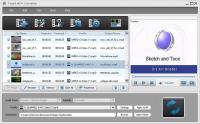
Tipard MOV Converter sorts the profile by the devices, General video, General audio, HD videos, etc, then it?s easy for you to find what you want one. You are given the access to choose profile respectively for different files or just click Apply to all to make all files use the same one.
5.Audio track and subtitle
Free to choose your preferred audio track and subtitle to customize your video.
6.Customize output settings
Set the Video Encoder, Resolution, Frame Rate, Video Bitrate. You can also directly input your own resolution; Set the Audio Encoder, Sample Rate, Channels, Audio Bitrate. You also can save all the output settings as your preference, which is saved in the user-defined column automatically. Whats new in version 6.1.50: 1.With NVIDIA CUDA technology, the converting speed is 6X faster now. 2.Support multi-core CPUs. Requirements: 800MHz Intel or AMD CPU, or above;512MB RAM or more Operating system: Win2000,Win7 x32,Win7 x64,WinOther,WinVista,WinVista x64,WinXP,Other Release notes: Major Update
ImTOO 3GP Video Converter v3.1 is a professional mobile phone tool. It supports converting
various popular formats including RM, RA, 3GP, 3G2, WAV, MP3, AAC, WMA, MPG, M4A, AVI,
MP4, MOV, WMV, MPEG, CUE, APE, CDA and AVI to 3GP,RA, RM,AAC, M4A,XviD.
Price: $25.46, Rating: 8.2, Downloads: 107 Download
Total Audio Converter is the best tool to convert mp3, wav, flac, ogg, ape and much more. Look closer at it: TAC supports all audio formats, has built-in CD ripper and audio player, can be handled via command line and is still very user-friendly.
Price: $17.91, Rating: 6, Downloads: 100 Download
Reezaa WMA Converter is an easy-to-use all to WMA converter Converts all formats Video and Audio to WMA,WAV,MP3,OGG,FLAC,AMR,AC3,AAC.It supports MP3, AVI, WMV, MOV, 3GP, MP4, FLV, RM, RMVB, VOB, DAT, MPEG, WAV, WMA, ASF, OGG, RA etc.
Price: $29.95, Rating: 0, Downloads: 93 Download
Jesterware DVD Audio Ripper is a powerful DVD Audio ripping program, which will take your DVD and convert the audio track into an audio formats of your choice.
Price: $24.99, Rating: 6, Downloads: 69 Download
User Rating
Rating:2.2 out of
5 Based on13 ratings.
13 user reviews.

 Tipard MOV Converter 6.1.50 details